

Node如何配置接收Email
12 分钟阅读
-- 阅读
-- 评论
Node packages
imapflow
准备工作
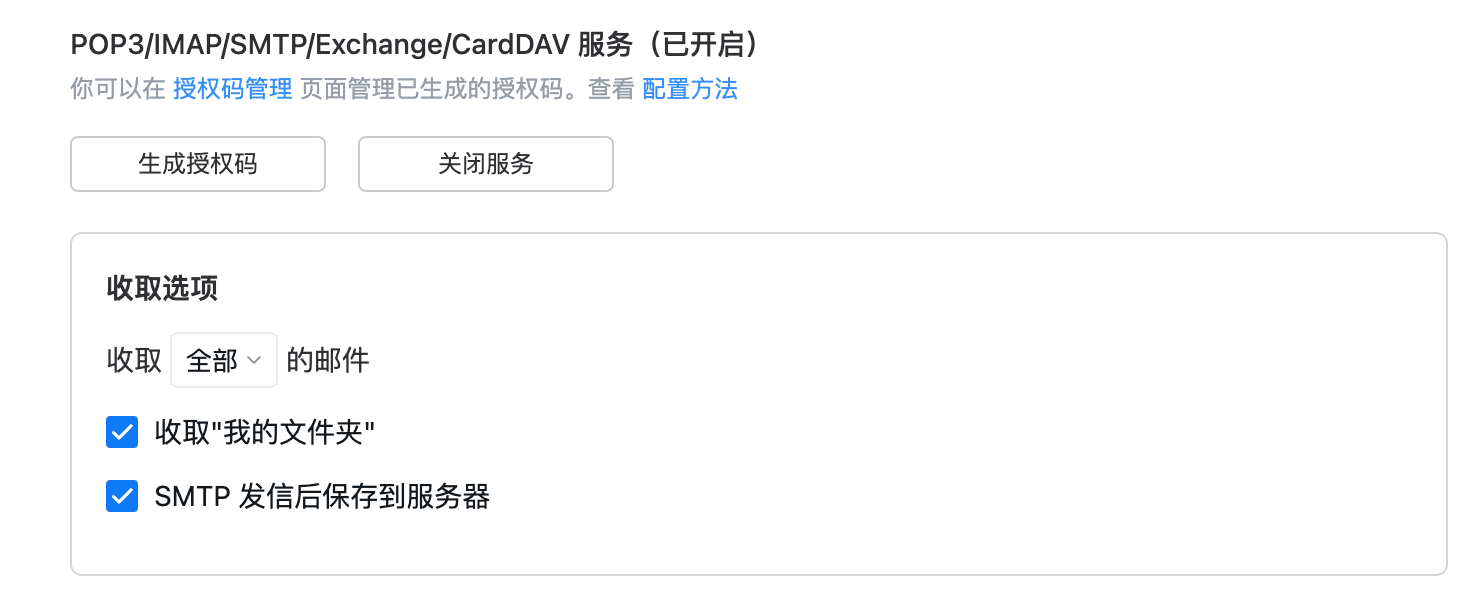
需要获取目前邮箱的密码,比如QQ邮箱需要获取服务密码,其他邮箱类似:
文件夹
邮箱区分文件夹,比如分为: 收信件,发信件,垃圾箱等,各个服务厂商可能存在不同的文件夹,比如QQ存在QQ订阅文件夹
special_use
每一个邮箱的name可能存在不同名称但是表示同一个文件夹,所以根据special_use区分,可以参考白皮书 RFC6154
flags
邮箱的flags表示一些状态:
\NoSelect表示这个邮箱没有选中,你可以选中该box读取邮件\Noinferiors表示不能在这个文件夹下再建子文件夹
心跳
一般可以使用idle保持一个邮箱之间的心跳,通过exists事件监听新邮件:
// ....others code
// init data
this.isIdling = false;

private async startIdleMode() {
  try {
    if (this.isIdling) {
      return
    }

    console.log('启动IDLE模式监听新邮件')
    this.isIdling = true

    // 启动IDLE
    await this.client.idle()

  } catch (err) {
    console.log('启动IDLE模式失败:', err)
    this.isIdling = false
  }
}
// ....others code
除此之外可以使用轮询的方式,使用发送noop的方式保活:
setInterval(async () => {
    try {
        if (client.usable) {
            await client.noop();
            console.log("NOOP sent");
        }
    } catch (err) {
        console.error("NOOP failed:", err);
    }
}, 5 * 60 * 1000);
完整代码
根据imap协议接收邮件,查看imap和pop3的区别请看:QQemail
import { ImapFlow, type MailboxLockObject } from 'imapflow'

export enum MailPlatformEnum {
	QQ = "QQ",
	Gmail = "Gmail",
	Lark = "Lark",
}

export interface EmailType {
	id: string;
	email: string; // 邮箱服务商的邮箱
	password: string; // 上面配置的邮箱服务商生成的密码
	host: string; // 根据每一个邮箱服务商不同host不同,比如QQ的是`接收邮件服务器:imap.qq.com,使用SSL,端口号993`
	port: number;
	type: MailPlatformEnum;
}

export enum EmailBoxEnum {
	Inbox = "\\Inbox",
	Sent = "\\Sent",
	Drafts = "\\Drafts",
	Trash = "\\Trash",
	Archive = "\\Archive",
	Junk = "\\Junk",
}


export interface EmailBoxType {
	key: string;
	name: string;
	specialUse: EmailBoxEnum;
	children: EmailBoxType[];
}

function buildMailboxMenu(mailboxes: any[]): EmailBoxType[] {
  const map: Record<string, EmailBoxType> = {}

  mailboxes.forEach(box => {
    if (box.flags && box.flags['\\NoSelect']) return

    map[box.path] = {
      key: box.path,
      name: box.name || box.pathAsListed,
      specialUse: box.specialUse || Array.from(box.flags || [])?.[0] || '',
      children: [],
    }
  })

  const tree: EmailBoxType[] = []

  Object.values(map).forEach(node => {
    const box = mailboxes.find(b => b.path === node.key)
    if (box?.parentPath && map[box.parentPath]) {
      map[box.parentPath].children!.push(node)
    } else {
      tree.push(node)
    }
  })

  return tree
}

class EmailManager {
  private info = {} as EmailType
  private lock?: MailboxLockObject
  private currentMailbox?; string

  constructor(data: EmailType) {
    this.info = data
    this.client = new ImapFlow({
      logger: false,
      host: data.host,
      port: data.port,
      secure: true,
      auth: {
        user: data.email,
        pass: data.password,
      },
    })
  }

    // 初始化
  async onInit() {
    await this.connect()
    this.setupGlobalEventHandlers()
    // 默认 imapflow 会启动idle链接
  }


  // 维护邮箱的链接
   async connect() {
    if (this.client.usable) {
      return
    }
    await this.client.connect()
  }

  // 判断邮箱是否连接状态
  async isConnected() {
    return this.client.usable
  }

  /*
  	格式化获取邮箱的文件夹
  */
  async getBoxes(): Promise<EmailBoxType[]> {
    const list = await this.client.list()
    return buildMailboxMenu(list)
  }

  // 全局监听一些事件
  private setupGlobalEventHandlers() {
    // 移除旧的监听器
    this.client.removeAllListeners('error')
    this.client.removeAllListeners('close')
    this.client.removeAllListeners('exists')
    this.client.removeAllListeners('expunge')
    this.client.removeAllListeners('flags')

    // 监听连接错误
    this.client.on('error', async err => {
      // TODO: server error
    })

    // 监听连接关闭
    this.client.on('close', async () => {
     // TODO: email server close
    })

    // 监听新邮件事件
    this.client.on('exists', async (data: any) => {
      console.log(`New Email:`, data)
      // TODO: new email
    })
  }

  // 邮箱断开链接
  async logout() {
    try {
      if (this.client && this.client.usable) {
        await this.client.logout()
      }
    } catch (err) {
      console.log('客户端登出失败:', err)
    }
  }

  // 读取每一个文件夹的email
  async checkMail() {
    const boxes = await this.getBoxes()
    for (let i = 0; i < boxes.length; i++) {
     // 只能同时打开一个文件夹所以加锁
      this.lock = await this.client.getMailboxLock(boxes[i].key)
      try {
         // 遍历每一个文件夹然后获取邮件
        await this.initMails(boxes[i]?.name)
      } finally {
        this.lock.release()
      }
    }
    // 当所有文件夹初始化完成,默认选中Index文件夹
    if (boxes.find(item => item.specialUse === EmailBoxEnum.Inbox)?.key) {
      this.lock = await this.client.getMailboxLock(
        (boxes || []).find(item => item.specialUse === EmailBoxEnum.Inbox)?.key!
      )
    }
  }

  // 打开邮箱某一个文件夹,只有打开文件夹才能接收邮件以及处理该文件夹其他信息
  async openBox(box: string) {
    return new Promise(async (resolve, reject) => {
      try {
        // 释放之前的锁
        if (this.lock) {
          this.lock.release()
          this.lock = undefined
        }

        // 打开邮箱
        await this.client?.mailboxOpen(box)
        this.currentMailbox = box
        this.setupGlobalEventHandlers()
        resolve(true)
      } catch (err) {
        console.log('openBox 错误:', err)
        reject(err)
      }
    })
  }


  // 读取某一个文件夹下的邮箱
  async initMails(mailbox: string) {
   	try {
      // 获取所有的邮件的uid,相当于获取云端所有的邮件数
      const remoteUids = await this.client.search({}, { uid: true })
      // 获取本地以及缓存下的所有邮件数
      const existing = []
      // 对比本地和远程的uid的邮件,然后排序从最近开始拉取邮件
      const toFetch = ((remoteUids || []).filter(uid => !existing.has(uid)) || []).sort((a, b) => b - a)


      for (let i = 0; i < toFetch.length; i++) {
        for await (const msg of this.client.fetch(
          uid,
          {
            uid: true,
            envelope: true,
            source: true,
            flags: true,
            bodyStructure: true,
          },
          { uid: true }
        )) {
          // 判断邮件上的标记是否已读转换成boolean
          const isRead = Array.from(msg?.flags || []).includes('\\Seen') || false

          const data = {
            uid: msg.uid,
            isRead,
            boxPath: mailbox,
            subject: msg.envelope?.subject, // 邮件主题/标题
            emailId: this.info.email,
            source: msg?.source, // 邮件正文
            status: Array.from(msg?.flags || []),
            // 发件人
            form: msg.envelope?.from?.map(item => {
              return {
                name: item?.name,
                email: item?.address,
              }
            }),
            // 发件人
            sender: msg?.envelope?.sender?.map(item => {
              return {
                name: item?.name,
                email: item?.address,
              }
            }),
            // 回复给
            replyTo: msg?.envelope?.replyTo?.map(item => {
              return {
                name: item?.name,
                email: item?.address,
              }
            }),
            // 发送给
            to: msg?.envelope?.to?.map(item => {
              return {
                name: item?.name,
                email: item?.address,
              }
            }),
            date: msg?.envelope?.date,
          }
          return data
        }
      }
    } catch(err) {
      // TDOO: err
    }
  }
}
代码仓库
评论 (0)
使用 GitHub 登录后发表评论
Loading...